Access Control Electric Strike Wiring Diagram
This enhanced page for Access Control Electric Strike Wiring Diagram is designed to be more practical than a generic concept sketch. It explains the device flow, common cable choices, a sensible installation sequence and the typical issues installers or specifiers need to check before commissioning.
Advanced hero diagram
Mobile simplified flow
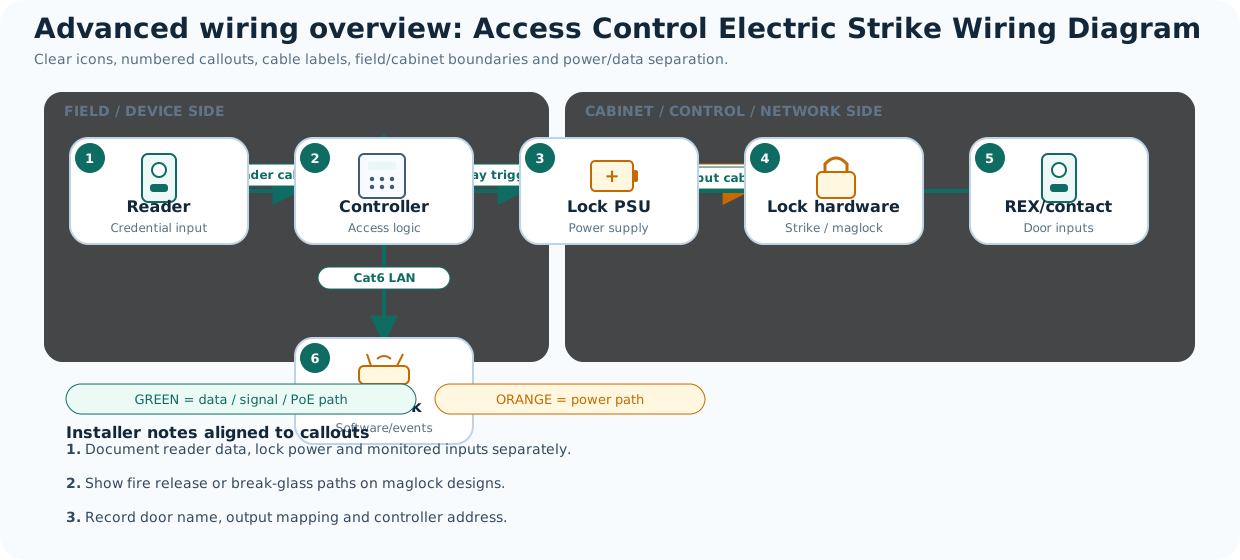
This premium version shows numbered callouts, labelled cable paths, power/data distinction and key installer notes.
Diagram overview
The diagram above shows the logical relationship between field devices, control equipment, power sources and user interfaces. Adapt the layout to suit the actual brand, terminal names, distance and site conditions.
Legend and key assumptions
Use this section to quickly interpret the devices shown in the diagram and the assumptions behind the layout.
- Door hardware choice affects the wiring, power requirement and egress design.
- Fire release and emergency exit behaviour should be documented clearly.
- Controller software configuration is not fully shown on the diagram.
What cable is commonly used?
The table below lists common cable choices for this type of system. Treat these as typical Australian industry choices rather than universal rules.
| Connection | Common cable | Typical purpose | Notes |
|---|---|---|---|
| Reader home run | 6 core or 8 core shielded security cable | Reader power and data | Cable choice depends on Wiegand or OSDP. |
| OSDP reader | 2 pair shielded twisted pair | RS-485 style reader bus | Follow polarity, shielding and daisy-chain rules. |
| Electric strike | 2 core lock cable | 12V/24V lock power | Confirm fail-safe or fail-secure before wiring. |
| Maglock | 2 core heavier-gauge lock cable | Lock power with break-glass and fire relay | Maglocks often need higher current and proper egress devices. |
| Door contact / REX | 4 core security cable | Status and request-to-exit inputs | Keep conductors labelled and separate by function. |
Recommended cable selection for this layout
This table is more specific to the diagram above and is intended to complement the broader cable table already on the page.
| Connection | Recommended cable | Why it is commonly chosen |
|---|---|---|
| Reader cabling | 6 core, 8 core or OSDP-rated pair | Depends on Wiegand or OSDP and the exact reader. |
| Lock power | 2 core lock cable | Choose conductor size based on current draw and distance. |
| Door contact / REX | 4 core security cable | Useful for door status and egress inputs. |
| Controller LAN / server connection | Cat5e or Cat6 | Used where the controller is networked. |
Step-by-step installation approach
A sensible workflow reduces mistakes and produces better documentation. The following sequence is a practical starting point.
Review the scope for access control electric strike wiring diagram and list every field device, controller, power supply, rack item and interface that needs to appear on the drawing.
Mark the physical locations on a site sketch so cable routes, service access and cabinet positions are clear before any cable is pulled.
Choose the cable type for each link based on power, data, distance, environment and manufacturer requirements rather than guessing or standardising everything to one cable.
Run and label each cable clearly at both ends. Use a naming convention that matches the diagram, cable schedule and equipment labels.
Terminate devices carefully and confirm terminal naming, polarity, shield handling, reader bus or PoE requirements before powering the system.
Test continuity, link status and basic device operation before final dressing and permanent fixing. This saves major rework later.
Commission the full system, confirm power loads, lock behaviour, monitoring logic or network settings, and record any variations from the original concept.
Update the final as-built diagram and keep it with the job records so the next technician can fault-find or expand the system efficiently.
Suggested installation sequence
Confirm the door hardware type, egress method and whether the reader protocol is Wiegand or OSDP.
Run reader, lock, door contact and REX cable, keeping all door naming consistent from the start.
Mount the controller and power supply, then terminate the lock output and monitored inputs carefully.
Power the system, enrol the reader or configure addressing, and test access, egress and door status.
Record door names, controller addresses, relay outputs and any fire release logic in the final handover.
Tools, materials and checks
Useful items on hand
- Label printer or marker system
- Cable tester / network tester as appropriate
- Manufacturer installation manual
- Basic hand tools and termination tools
- Site plan or sketch for route marking
- Notebook or digital cable schedule
Before you power up
- Confirm voltage and polarity.
- Check PoE class and total switch budget if relevant.
- Verify lock type, relay logic or monitored input behaviour where relevant.
- Check cable labels against the diagram and schedule.
- Make sure pathways are protected and weather suitable.
- Photograph the final terminations for future reference.
Fault finding and troubleshooting notes
Common fault scenarios
- Reader beeps but door does not release: check credential permissions, lock power, relay mapping and unlock duration.
- Door held or forced alarm issues: verify contact state, REX logic and the software door profile.
- Maglock stays energised unexpectedly: check break-glass, fire release inputs and whether the PSU is being interrupted correctly.
- OSDP instability: check polarity, addressing, shielding and daisy-chain order.
Commissioning checks
- Verify that every labelled cable appears at the correct destination.
- Photograph key terminations, cabinets and field devices for the as-built record.
- Record firmware, addressing and device names where relevant.
- Confirm the client or end user understands the reset, monitoring or remote access workflow.
Common mistakes to avoid
- Using the wrong cable type because the device only looked similar to another one.
- Ignoring distance limits, voltage drop or PoE budget calculations.
- Forgetting that lock power, relays and monitored inputs often need separate planning.
- Leaving cables unlabelled or relying on memory for panel, switch or controller ports.
- Skipping the as-built update after the commissioning stage.
Enhanced page note: These mistakes are especially common when diagrams are copied without checking the actual hardware specification, power requirement or site distance.
Related product types
Frequently asked questions
Can I use Cat6 for everything?
No. Cat6 is excellent for IP and PoE devices, but alarms, reader buses, lock circuits, 2-wire intercoms and power feeds often need different cable types.
Do I still need the manufacturer manual?
Yes. This page is a practical guide, but terminal naming, current draw, address settings and approved cable types must always be confirmed in the actual product documentation.
Should I create a cable schedule as well as a diagram?
Absolutely. A cable schedule makes installation, testing, handover and future maintenance much easier.